
Free · Windows 64-bit · Version 1.1.2
Visual Image Sequencer
Bring order to your illustrations. Arrange a set of images in the order you want, then export numbered copies of them. Your original images are not renamed, deleted or recompressed, and the application works offline.
- No account or email
- Works offline
- No administrator access

What it is for
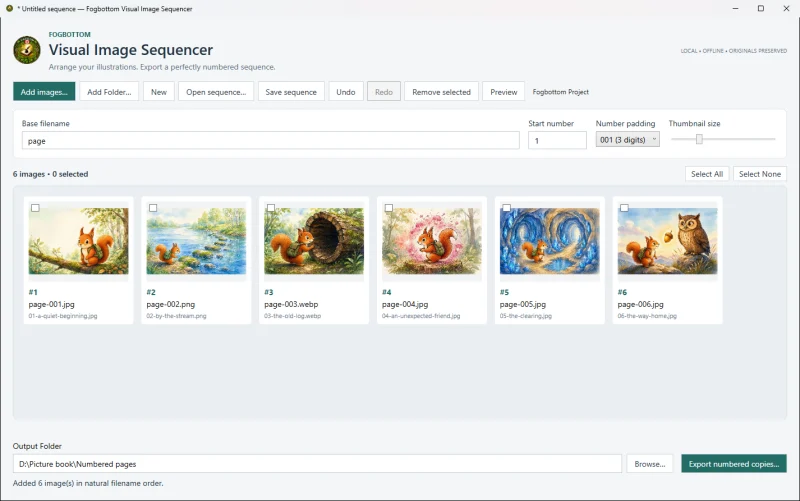
When a project depends on pictures being in a precise order — for example the pages of an illustrated book or a sequence of artwork — Visual Image Sequencer lets you put them in order visually by dragging thumbnails. It then exports copies with consistent numbered filenames, such as page-001.png, page-002.png and so on. The copies are byte-for-byte identical to the originals, with their image metadata kept. Existing files in the output folder are never overwritten.
Main features
Add images your way
Add individual images or a folder, or drag files and folders from File Explorer. JPG/JPEG, PNG and WebP are supported.
Arrange by dragging
Drag a thumbnail to a new position; a marker shows where it will go. Double-click an image to preview it.
Undo and Redo
Adding, removing and rearranging images can be undone and redone.
Numbered export
Set the base filename, starting number and padding, and see the resulting names as you type.
Save and reopen
Save a sequence as a .fvis project with its order, naming settings and output folder.
No conversions
Image bytes are copied exactly; extensions and embedded metadata are kept.
Download Visual Image Sequencer 1.1.2
Free for personal, educational and commercial use under the Fogbottom Freeware Licence, included with the download. No registration, activation or licence key.
Windows installer Recommended
Installs for your Windows account with a Start menu shortcut and an uninstaller.
Download installer (46.3 MB)- File
- Fogbottom-Visual-Image-Sequencer-1.1.2-Setup.exe
- Size
- 46.3 MB (48,554,293 bytes)
- SHA-256
- 4460e034acc6bc832ee435ed76007969f3fc624ba7b6bc64f77c1f1891f1e57c
Portable ZIP
No installation: extract the folder and run the program from it.
Download ZIP (61.2 MB)- File
- Fogbottom-Visual-Image-Sequencer-1.1.2-win-x64.zip
- Size
- 61.2 MB (64,174,724 bytes)
- SHA-256
- 9955032759d4edb1578a345546c3c4623bd7a6adeb9cd3ce04f5e4164c75d1c6
System requirements
- Operating system
- Windows, 64-bit (x64). Windows 11 x64 is the tested target.
- Other software
- None. No separate .NET runtime is needed.
- Permissions
- No administrator access needed.
- Image formats
- JPG/JPEG, PNG and WebP. Images above 50 megapixels are not previewed.
- Internet
- Not required. The application works offline.
Installing, updating and removing
Installer: run Fogbottom-Visual-Image-Sequencer-1.1.2-Setup.exe. It installs for your Windows account only, without administrator access, and adds the program to the Start menu under Fogbottom.
Portable ZIP: right-click the downloaded ZIP, choose Extract All, then open the folder and double-click Fogbottom.VisualImageSequencer.exe.
To uninstall, use Settings › Apps › Installed apps. Your images, projects and exported copies are never removed.
Checking your download
In PowerShell, run Get-FileHash .\Fogbottom-Visual-Image-Sequencer-1.1.2-Setup.exe -Algorithm SHA256 and compare the result with the checksum above. The programs are not yet code-signed, so Windows may ask you to confirm before running them.