
FogFrames
Version 1.0.0 · Free · Windows 10 and 11 (64-bit)
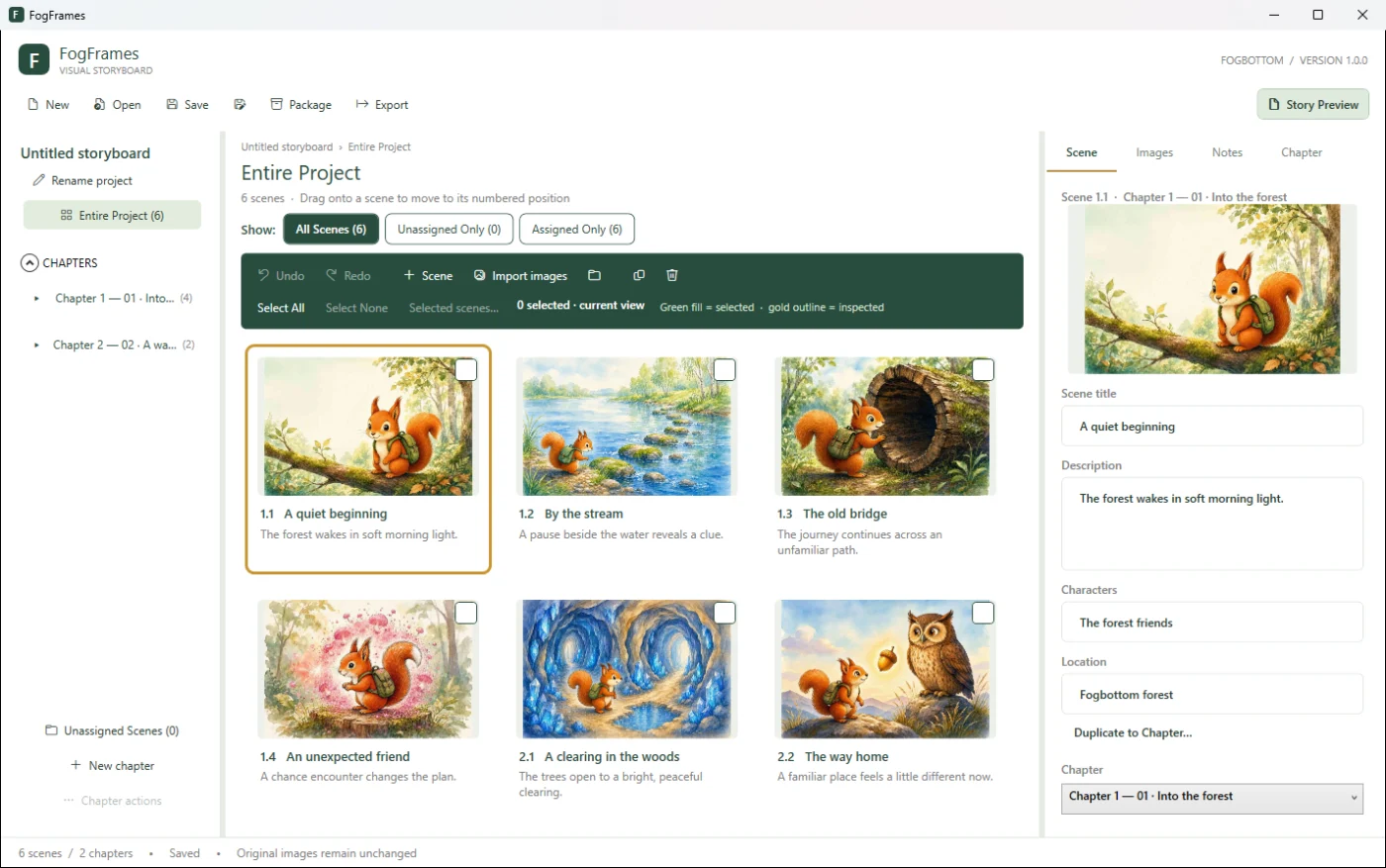
A visual storyboard for Windows. Lay out the scenes of a story as picture cards, group them into chapters, keep notes and reference images with each scene, and export the storyboard as a PDF or as PNG contact sheets.

What it is for
FogFrames helps you see a story's shape. Each picture becomes a scene card that you can describe, annotate and drag into place, and scenes can be grouped into numbered chapters. When the storyboard is ready, export it as a printable PDF or as contact sheets to share or review.
Your pictures stay where they are: FogFrames refers to them in place and never moves, renames, edits or deletes them. It works offline and doesn't collect or send any information.
Main features
- Scenes and chaptersPicture cards grouped into automatically numbered chapters, with unassigned scenes kept separately. Titles, descriptions and notes for scenes and chapters, plus chapter status.
- Primary and reference imagesOne primary picture per scene, shown on its card and in exports, and any number of reference images.
- Easy importingImport from files, folders or File Explorer drag and drop. JPEG, PNG, WebP, BMP, GIF and TIFF are supported.
- Arrange by draggingDrag cards into position or onto another chapter. Windows-style selection (click, Shift-click, Ctrl-click, Select All) with batch move, duplicate and delete.
- Undo and RedoEvery change, including batch moves and imports, is one Undo step.
- Safe, portable projectsA project is a single
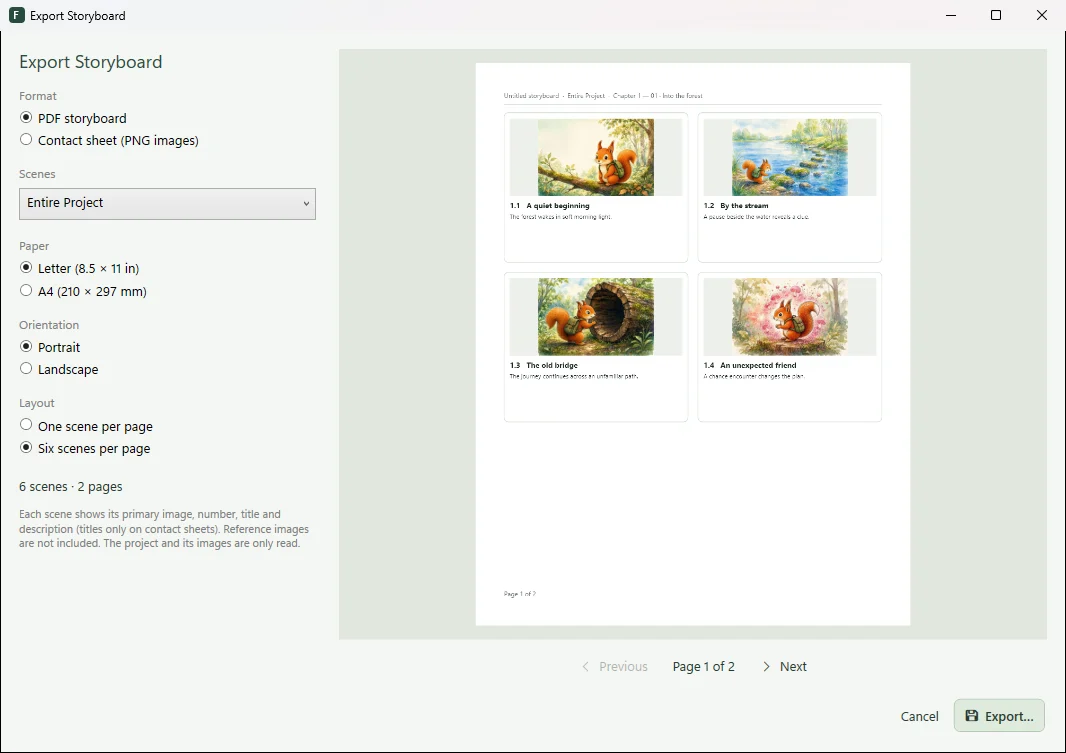
.fogframesfile. Saving keeps the previous version as a.bakfile. Locate Missing Images reconnects pictures that were moved, and Package Project creates one ZIP with the project and copies of its pictures. - PDF storyboardsLetter or A4, portrait or landscape, one or six scenes per page, with a live preview and print-quality pictures from the original files.
- Contact sheets and Story PreviewPNG contact sheets in 2, 3 or 4 columns, and a read-only Story Preview.
System requirements
| Operating system | Windows 10 or Windows 11, 64-bit (x64). |
|---|---|
| Other software | None. FogFrames includes the .NET runtime and its graphics libraries; nothing is downloaded or installed separately. |
| Permissions | No administrator rights needed. |
| Picture formats | JPEG, PNG, WebP, BMP, GIF and TIFF. |
| Internet | Not required. FogFrames works offline. |
| Language | English interface. |
Installing and getting started
Installer
Run FogFrames-1.0.0-Setup.exe. It installs for the current Windows user only, into %LOCALAPPDATA%\Programs\Fogbottom\FogFrames, with a shortcut in the Fogbottom group of the Start menu and, if you choose, on the desktop. Uninstall it from Settings › Apps › Installed apps; your projects, images and exports are never changed or removed.
Portable ZIP
Extract the whole ZIP to a folder you can write to and run FogFrames.exe, keeping every file beside it. The ZIP also includes a small sample storyboard in its Sample folder.
First steps
- Start FogFrames; a new, empty storyboard opens. Choose Rename project to name it.
- Choose New chapter, then Import images: each picture becomes a scene card.
- Click a card to add its title, description and notes; drag cards to rearrange them.
- Press Ctrl+S to save, then choose Export for a PDF storyboard or contact sheet.
The Getting Started guide and full User Guide are included with the program.
Download FogFrames 1.0.0
Free to use and redistribute under the Fogbottom Freeware Licence, included with the download. No registration, activation or licence key.
Windows installer Recommended
Installs for the current user, with Start menu shortcuts and an uninstaller.
Download installer (.exe, 47.7 MB)- File
- FogFrames-1.0.0-Setup.exe
- Size
- 47.7 MB (50,035,845 bytes)
- SHA-256
- 4fca12459435d75298a947147fa9765249e7bb4ac3bc4ab4156100641a22654e
Portable ZIP
No installation. Includes a sample storyboard.
Download portable ZIP (68.0 MB)- File
- FogFrames-1.0.0-win-x64.zip
- Size
- 68.0 MB (71,265,706 bytes)
- SHA-256
- e9067a449bad8707ab45608e0d515fd6dade6179c51d592e687c331fe32126fb
Unsigned program: Windows may show a warning
FogFrames is not code-signed, so Windows SmartScreen may ask you to confirm the first time you run the installer or the program. Before confirming, check that the file came from fogbottom.com and that its SHA-256 checksum matches the one shown above. If your organisation's security policy blocks it, follow that policy.
To check a checksum, open PowerShell in your Downloads folder and run:
Get-FileHash .\FogFrames-1.0.0-Setup.exe -Algorithm SHA256
All checksums are also listed in SHA256SUMS.txt.